
Hacking Facebook accounts is one of the trending
topics in the Internet. Many people become victim of
Facebook hacking, in that more than half of them
aren’t able to recover their hacked account due to
lack of awareness of recovery techniques. These
recovery options will help you recover your account easily.

Let me break down the possibilities of hacked
Facebook accounts and its recovery techniques.
1. Forgot Password or Password Changed
This is the most common case of recovering hacked
Facebook account where the password has been
changed but your Facebook account still have your
associated email address or mobile number.
Go to Facebook Forgot Password option
Enter your email or mobile number or username or name in the textbox and click search. Generally name is not recommended since there may be more than one person with
the same name. Username is unique Facebook
identity, that you may find in your profile URL.
Example : https://www.facebook.com/ zuck. Here zuck is the username of Mark Zuckerberg.
You should see your profile with recovery email
address and mobile number if any. Select mobile number or email address that you can access right now and then click Continue.
Check your mailbox if you choose email / mobile
inbox if you choose mobile number to get the
recovery code. Enter the recovery code to continue.
That’s all. Set your new password and get back
to your Facebook account.
2. Password Changed & No Access to Associated Email
In this case hacker changed your Facebook
password and you lost or forgot password of your
email resulting you have no access to Facebook
associated email.
Go to Facebook Forgot Password option
Enter your email or mobile number or username or name in the textbox and click search.
Click “No longer have access to these?” at the bottom of the reset password dialog box.
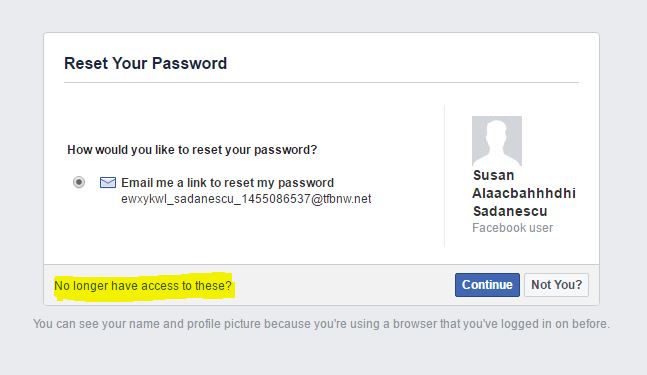
You will be directed to extended recovery
options. It may vary for different Facebook
accounts
Security Question : This option is unavailable for new Facebook accounts but
old Facebook users can make use of it. You
can answer this question to proceed to set
new password if it is listed as one of the
extended recovery options.
Trusted Contacts : You can use this option only if you have already choosen trusted
contacts.
Enter a new email address or phone that
you know you can access and click
Continue.
Click Reveal My Trusted Contacts and type
the full name of one of your trusted
contacts.
You’ll see a set of instructions that
includes a URL. The URL contains a special
security code that only your trusted
contacts can access. Call your friends and
give them the URL so that they can open
the link and give the security code to you.
Use the security codes from your trusted
contacts to access your account.
3. Password & Associated Email Address Changed
Here the hacker changed your password as well as
your associated email address. This case is
somewhat hard to recover since the hacker blocked
a way to recover. We have two options in this case.
You should either have access to mobile number or
old email address.
Recover using Mobile Number
Go to Facebook Forgot Password option
Enter your mobile number in the text box and
click search.
You should see your profile with recovery email
address and mobile number if any. Select mobile
number or email address that you can access
right now and then click Continue.
Select your mobile number and then click Continue.
Check your mobile inbox for recovery code and
enter the recover code in the given text box.
That’s all. Set your new password of your
Facebook account.
Recover using Email Change Notification
This method can be applied only if you try in few days
after your account was hacked.
Login to your email account (email that you have
given in Facebook) and search for emails from
Facebook about the change of email address.
Usually that email subject would be “Facebook
primary email changed to”.
Click “If you didn’t do this, please secure your account.” link in that email.
You will be prompted to “Secure your account“, click continue to proceed.
In next step there might be variety of recovery
options given depending upon your account and
security.
Upload a ID : You should upload a government id through the given steps. A
Facebook representative will verify it and
activate your account and also will notify
about it in email
Verify your Date of Birth : You should enter your date of birth to proceed to your
Facebook account.
Guess your friends using their photos : You need to select 5 friends name out of 7 by
seeing their photos.


No comments:
Post a Comment